


PLU HS Programming Tips and Sample Problems
Problem Format
Each problem has a number, name, description of the problem, description of input, description of output, sample input, and sample output.
Problems will have either no input or read input from a specified file.
The solution for a problem should be written to standard output (i.e., the monitor).
Tips
- Bring a hard copy of code (e.g., code to declare variables, use an if statement, write a for/while loop, read data from standard input (i.e., keyboard)).
- Know how to define variables and use them.
- Be able to read both numeric input (e.g., integer and floating point) and character input (e.g., character, string, line).
- Know how to manipulate strings (e.g. determine length of a string, concatenate strings, find character at position i in a string, find characters in a string).
- Know how to write a loop.
- Know how to create and use arrays.
Contest Results, Pictures, Problems, and Data
Please follow this link to current and previous contest results.
For more sample problems visit the Puget Sound Computer Science Teachers Association website.
HuskyMap / Problem Submission / Judgments
The contest will be using the HuskyMap platform. This software automates problem submission, judging, scoring, and displaying results.
Problem solutions are submitted using HuskyMap’s web interface, although teams may use IDEs or editors on the provided machine and upload their work.
Web Interface and Example Problem:
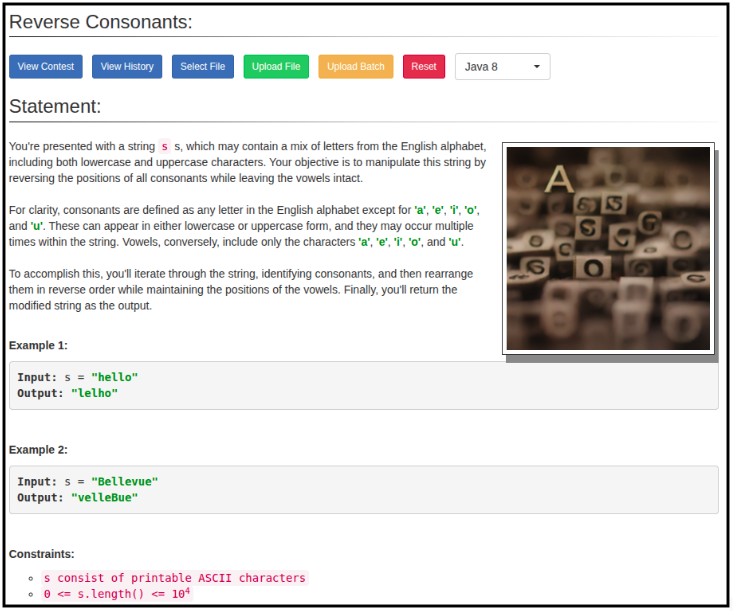
Judgements:
When students submit problems they will receive one of the following judgments:
- Yes
- No – Compilation Error
- No – Run-time Error
- No – Time-limit Error
- No – Wrong Answer
- No – Excessive Output
- No – Output Format Error
- No – Other, Contact Staff
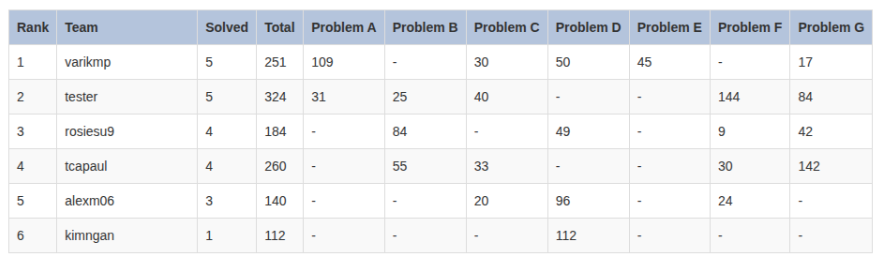
Contest Results:
As the contest progresses, team rankings are displayed based on number of problems solved and total time required to solve them.
Social Media